Quick Answer: Can I Open an Online Shop in Nepal Without Technical Skills?
Yes. In 2026, any Nepali shop owner can launch an online store in under one hour using platforms with QR-based eSewa/Khalti payments and no coding required. Total monthly cost: as low as NPR 199.
Why Every Nepali Business Needs an Online Shop in 2026
Every day, thousands of Nepali customers search Google for products they want to buy — clothes in Kathmandu, electronics in Biratnagar, handicrafts in Bhaktapur, and groceries in Pokhara. If your shop isn't online, they're buying from someone else.
Nepal e-commerce stats 2026:
- 84% of Nepal's population now has access to internet facilities
- Mobile internet dominates, making up 61.47% of all internet users
- Active digital wallet users in Nepal: 16.75 million
- eSewa leads with 8+ million users; Khalti has approximately 5 million users
- Nepal's e-commerce market revenue reached US$928 million in 2025
- Digital payments volume estimated at USD 500 million (2023), growing 20-25% annually
- Mobile commerce accounts for nearly 70% of online transactions
The businesses winning online in Nepal right now are not necessarily the largest or best-funded. They're the ones who showed up early, set up a clean store, added good photos, and were consistent about promotion.
What Is an Online Shop? (Nepal Definition)
An online shop is a website where customers browse products, add to cart, and pay digitally — without visiting your physical location.
It is NOT:
- A Facebook page
- An Instagram shop
- A WhatsApp catalog
Those are marketing channels. An online shop is your own website that you fully control.
Online Shop vs Facebook vs Instagram: Which One Do Nepali Customers Trust?
| Feature | Online Shop (Your Website) | Facebook Shop | Instagram Shop |
|---|---|---|---|
| Appears on Google Search | ✅ Yes | ❌ No | ❌ No |
| Accepts eSewa/Khalti QR | ✅ Yes | ❌ No | ❌ No |
| You own customer data | ✅ Yes | ❌ No | ❌ No |
| Can be banned | ❌ Never | ✅ Any time | ✅ Any time |
| Works at 2 AM without you | ✅ Yes | ⚠️ Partially | ⚠️ Partially |
| Professional credibility | ✅ High | ⚠️ Medium | ⚠️ Medium |
Bottom line: Use social media to market. Use your own website to sell.
What You Need Before Opening an Online Shop in Nepal
1. Product List (10–20 Items)
Write down for each product: name, description, price in NPR, stock quantity.
2. Product Photos
Single biggest factor in online sales. Use natural light, clean background, multiple angles. A good smartphone is enough.
3. Delivery Plan
Decide: which areas you deliver to, delivery charges, timeframes, minimum order amount.
4. Payment Setup (QR is Simplest)
Upload your personal eSewa and Khalti QR codes. Customers scan and pay directly to you. No merchant account needed.
5. Basic Return Policy
Even one paragraph builds customer trust.
⚡ Pre-Launch Checklist
- 10–20 products with names, prices, descriptions
- At least one photo per product
- Delivery areas and charges decided
- eSewa and Khalti QR codes saved
- Basic return policy written
- Contact number ready for order support
Step 1: Choose Your Platform (Cost Comparison Nepal)
| Platform | Monthly Cost (NPR) | Setup Time | QR Payment | Tech Skill Needed |
|---|---|---|---|---|
| Custom developer | 30,000–80,000 one-time | 4–8 weeks | Requires setup | None (they do it) |
| WooCommerce (WordPress) | 2,000–5,000 | 3–7 days | Manual setup | High |
| Shopify | 4,000–8,000 | 1–3 days | Limited | Medium |
| HamroLink Local | 199 | <1 hour | Upload your QR | None |
| HamroLink Business | 399 | <1 hour | Upload your QR | None |
For most Nepali small businesses and first-time online sellers, HamroLink is the most practical option — you simply upload your eSewa or Khalti QR code and you're immediately ready to accept payments. No merchant account application, no approval waiting period, no transaction fees from a payment gateway.
Why QR payments work perfectly for Nepali small businesses:
- Customers already scan QR codes daily at shops and restaurants across Nepal
- Nepal's QR payment network has over 1.8 million QR code acceptance points nationwide
- No merchant registration fees or approval waiting period
- Works with any personal eSewa or Khalti account
- Zero platform transaction fees on your end
Step 2: Set Up Your Store (15 Minutes)
Once you've signed up on your chosen platform:
- Choose a template that matches your business type (local shop, boutique, food, handicrafts)
- Add your business name and logo
- Write a short shop description
- Add your location and contact details
Step 3: Add Your Products
For each product:
- Click "Add Product"
- Enter the product name and description
- Set the price and stock quantity
- Upload your product photo(s)
- Choose a category (helps customers browse and helps Google index your products)
Product description tips that sell:
- Lead with the benefit: "Keeps your milk fresh for 3 days" not "1L insulated bottle"
- Include size, material, weight, color — whatever is relevant for your product type
- Mention who it's ideal for: "Perfect for Nepali kitchens", "Great gift for Dashain"
- Keep it under 100 words — scannable beats exhaustive
Step 4: Set Up QR Payments (Nepal's Easiest Method)
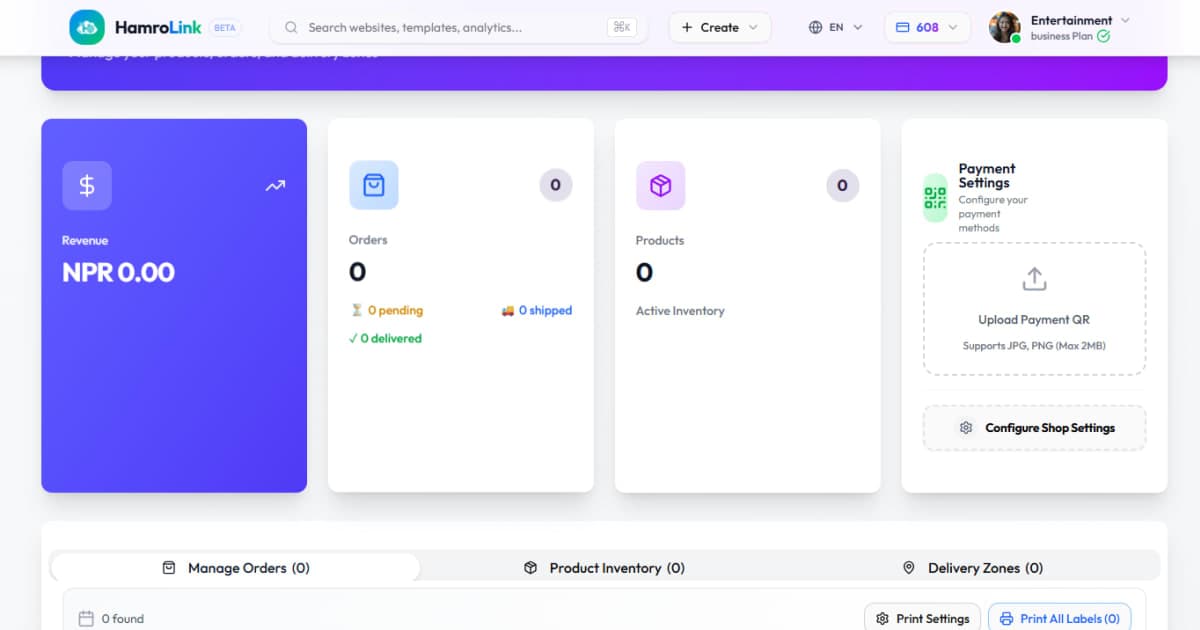
This is where local platforms differ from international ones. With HamroLink, you use a simple QR-based payment system — the same way customers already pay at shops and restaurants across Nepal.
No merchant account needed. No approval waiting. No transaction fees.
How to set it up:
- Go to Store Settings → Payments in your dashboard
- Upload your eSewa QR code (screenshot it from your eSewa app)
- Upload your Khalti QR code (screenshot it from your Khalti app)
- Enable Cash on Delivery if you want to offer it
- Set a minimum order amount if applicable
When a customer places an order, they'll see your QR code at checkout, scan it with their eSewa or Khalti app, and pay directly into your personal wallet. You get a notification, confirm the payment, and process the order.
Market context: eSewa holds approximately 75% of digital transactions in Nepal's digitized economy, while Khalti is particularly popular among youth and tech-savvy demographics with aggressive cashback campaigns. Only about 5% of Nepal's national economy has been digitized to date — meaning massive growth opportunity ahead.
Step 5: Set Up Delivery Zones
In your dashboard under Delivery Settings:
- Define which areas you deliver to (by city, district, or specific zones)
- Set delivery charges per zone (e.g., free within Kathmandu, NPR 150 outside valley)
- Set estimated delivery time per zone
- Enable or disable pickup option
Be specific: "We deliver within Kathmandu Valley — 1–2 days, NPR 100 delivery charge" builds customer trust. Vague terms lose sales.
Step 6: Add Key Pages
Your online store needs more than just a product list. Add these pages before you launch:
- Home page — your storefront, featuring hero image, best products, and your key offer
- About page — who you are, where you're based, why customers should trust you
- Contact page — phone, WhatsApp, email, address
- Return/Refund policy — even a short one builds massive trust
- FAQs — delivery time, payment methods, exchange process
Most e-commerce platforms include templates for all of these. You just fill in your content.
Step 7: Test Everything Before Going Live
Before you share the link with anyone:
- Add a test product at NPR 1 and place a test order yourself
- Complete the checkout — does it reach payment?
- Test eSewa and Khalti payment flows
- Check that order confirmation appears after payment
- Open the site on your phone — does it look right? (Mobile commerce accounts for nearly 70% of online transactions in Nepal)
- Check that product images load quickly
- Click every link in the navigation
Fix any issues, then publish.
Step 8: Launch and Promote
Your store is live. Now tell people about it:
- Post your store link on Facebook and Instagram with 2–3 of your best product photos
- Add the link to your WhatsApp status and business profile
- Print your store QR code and put it on your shop counter, packaging, and visiting cards
- Add your store URL to your Facebook page's website field
- Share in relevant Facebook groups (local buy-sell groups, business groups for your city)
How to Get Sales: 5 Channels That Work in Nepal
1. WhatsApp (Most Powerful Channel)
WhatsApp is Nepal's most-used communication app. Use it:
- Send your store link to existing customers directly
- Add your store URL to your WhatsApp Business profile
- Post new products and offers to your WhatsApp status weekly
- Create a broadcast list of your top 50 customers and send them exclusive offers
2. Facebook & Instagram Posts
You don't need a big budget. Post regularly:
- New product arrivals with photos and price
- "This week's offer" — a limited discount with a deadline
- Customer testimonials or photos of happy customers with their orders
- Behind-the-scenes content — packaging, sourcing, your shop floor
Link every post directly to your online store URL, not just to your Facebook page.
3. Email Marketing
Every visitor who gives you their email is a customer you can reach for free, forever — without depending on Facebook's algorithm.
When you run a Dashain sale, an anniversary offer, or restock a popular product, email your list directly and every one of them sees it.
4. QR Code Everywhere
Most platforms automatically generate a QR code for your store. Print it on:
- Shop signage and counter display
- Product packaging and bags
- Visiting cards and letterheads
- Delivery boxes
A customer who scans your QR code once and buys online is 3x more likely to reorder than one who only found you through Facebook.
5. AI Chatbot (24/7 Sales)
Most lost sales happen at night — when a customer has a question about stock, price, or delivery and nobody answers. With an AI chatbot, your store answers questions automatically:
- "Do you have this in size M?"
- "How long does delivery to Chitwan take?"
- "What's your return policy?"
The chatbot answers instantly. For complex orders, it redirects to WhatsApp. You wake up to orders, not missed conversations.
What Does Running an Online Shop in Nepal Actually Cost? (Real Breakdown)
| Cost Item | Estimated Amount (NPR) | Notes |
|---|---|---|
| HamroLink Local plan | 199/month | Up to 30 products, QR payments, AI chatbot |
| HamroLink Business plan | 399/month | Up to 80 products, email marketing |
| Payment processing | 0% platform fee | Customer pays directly to your eSewa/Khalti via QR |
| Packaging | 10–50 per order | Depends on product type |
| Delivery (if outsourced) | 80–200 per order | Depends on zone and courier |
| Custom domain (optional) | ~1,500–2,500/year | e.g., yourshop.com |
Example: A business doing 50 orders/month at NPR 500 average order value (NPR 25,000 revenue) pays just NPR 199–399 in platform costs — less than 2% of revenue.
7 Common Mistakes to Avoid
| Mistake | Why It Hurts |
|---|---|
| Bad product photos | #1 reason online shops fail to convert. Blurry, dark photos signal unprofessionalism |
| No delivery clarity | "We deliver all over Nepal" with no timeframe creates confusion and abandoned carts |
| Ignoring Cash on Delivery | Many Nepali customers — especially first-time online buyers — still prefer to pay on delivery |
| Launching with too many products | Start with 10–20 best products. A focused catalog converts better than a cluttered one |
| No promotion after launch | Your store going live is not enough. Plan at least two weeks of active promotion |
| Forgetting mobile | Over 80% of online shopping in Nepal happens on mobile. Test on phone before launch |
| No return policy | Customers won't trust you without one — even a short policy builds trust |
Online Shop SEO: How to Get Found on Google Nepal
An online shop that ranks on Google gets free traffic forever. Do this from day one.
Use Keywords in Product Titles
❌ "Red Kurta" ✅ "Women's Red Cotton Kurta — Dashain Special | Nepal"
Think about what your customer would type into Google when searching for this product and use those words naturally.
Write Unique Product Descriptions
Copy-pasting supplier descriptions is one of the most common SEO mistakes in e-commerce. Write your own — even a short original description in your voice performs better than 300 words of copied text.
Create Category Pages That Target Search Terms
❌ "Shop" ✅ "Nepali Handicrafts — Pashmina, Thangka, Dhaka Products"
Category page titles are often the highest-traffic pages on an e-commerce site.
Set Up Google Business Profile (Free)
Even for an online-only store, a Google Business Profile listing gives you credibility and makes your business appear in local search results. It's free and takes about 15 minutes to set up.
Schema Markup for Products
Many e-commerce platforms automatically add Product schema markup to your product pages — which means Google can display your product price, availability, and ratings directly in search results, without the customer even having to click.
Conclusion
Opening an online shop in Nepal in 2026 is more accessible than it has ever been. Digital payments via eSewa and Khalti are mainstream — with 16.75 million active digital wallet users nationwide. Mobile internet has reached 84% of the population. QR codes are accepted at over 1.8 million locations across the country.
And with platforms designed specifically for Nepali businesses, you can have a fully functional online store live in under an hour — with no coding, no developer, and no complicated setup.
The businesses winning online in Nepal right now are not necessarily the largest or the best-funded. They're the ones who showed up early, set up a clean store, added good photos, and were consistent about promotion.
Your store could be live today.
Get started: → HamroLink — Free trial, no credit card required.
Frequently Asked Questions
How do I open an online shop in Nepal?
Choose a platform, add your products with photos and prices, upload your eSewa or Khalti QR code for payments, set up your delivery zones, and publish. With HamroLink, this process takes under an hour with no coding required. You can start with a free trial at [hamrolink.com](https://app.hamrolink.com)
How much does it cost to open an online shop in Nepal?
With HamroLink, you can start completely free. Paid plans begin at NPR 199/month (Local plan — up to 30 products). A custom developer-built store costs NPR 30,000–80,000 upfront plus ongoing maintenance.
Can I accept eSewa and Khalti payments on my online shop?
Yes. With HamroLink, you upload your eSewa and Khalti QR codes to your store. Customers scan the QR at checkout and pay directly into your personal wallet — no merchant account registration or approval process needed. It works instantly from the day you sign up.
Do I need to register my business to open an online shop in Nepal?
If you are starting small—especially if you are selling home-made products like pickles, handicrafts, or knitted wear—you don't need formal registration to get started. Since HamroLink uses QR-based payments tied to your personal eSewa or Khalti account, there is no complicated merchant approval process or paperwork required to launch. You can literally start selling today. However, as your business grows and you look to build a long-term brand, registering with your local municipality is a good step to gain more customer trust and legal clarity.
How many products can I sell on HamroLink?
The free plan does not include a product store. The Local plan (NPR 199/month) supports up to 30 products. The Business plan (NPR 399/month) supports up to 80 products. Both plans include QR payment support.
Can I run an online shop from home in Nepal?
Yes. Many successful Nepali online sellers operate entirely from home — clothing, handicrafts, food products, handmade items. You need a product, photos, a delivery plan, and a platform. That's it.
What is the best platform for an online shop in Nepal?
For Nepali businesses, HamroLink is the most purpose-built option — it supports QR-based eSewa and Khalti payments out of the box (no merchant account needed), has Nepali language support, and uses templates designed for local business types. International platforms like Shopify require significant extra setup for local payments and don't have Nepal-specific templates.
How do I get customers to my online shop?
Start with WhatsApp (share your link with existing customers and add it to your WhatsApp Business profile), then post regularly on Facebook and Instagram with product photos and your store link. Print your QR code on packaging and visiting cards. Over time, SEO from your product pages and blog will bring organic traffic from Google.
What if a customer wants to return a product?
Set a clear return policy on your website before you launch — what can be returned, within how many days, and the process. Most small Nepali online shops offer exchanges within 3–7 days for damaged or incorrect items. Clear policies build trust and reduce disputes.
HamroLink Digital — Built for Nepal
Build your professional website from NPR 399/month — no coding required.
Start for FreeComments
Be the first to leave a comment.