You're losing customers at 2 AM. While you sleep, someone in your city is searching Google for exactly what you sell. They find your competitor's website, see their services, and message them. You wake up to nothing.
That's the reality for thousands of Nepali businesses still relying only on Facebook and messaging apps. But it doesn't have to be your reality. A simple business website can make your business look more professional, appear on Google, and bring you customers even when you're offline.
Ask yourself: When was the last time YOU Googled a business before visiting? Exactly. Your customers do the same.
Want to skip the technical hassle altogether? HamroLink is Nepal's first AI-powered business presence platform—soon you'll be able to create a website in minutes and focus on your business, not on code.
In this beginner-friendly guide, you'll learn step by step how to create a professional business website in Nepal, what it costs, and how to avoid common mistakes.
Why Every Nepali Business Should Have a Website
A website is now a basic requirement for serious businesses in Nepal, whether you run a kirana pasal in Kirtipur, a hardware store in Itahari, a beauty salon in Pokhara, or a trekking agency in Thamel.
If you want to understand why many Nepali businesses still don't have websites (and what is changing), you can read this article:
Why Nepali Businesses Don't Have Websites.
Build Professional Credibility
Customers naturally trust businesses that have an official website. A website with your own domain, clear services, and proper contact information signals that:
- You are serious about your business
- You are not "just a Facebook page" that might disappear
- You are easier to verify and contact
Even a simple one-page site can separate you from competitors who rely only on social media.
Be Easier to Discover Online
Think about your own behavior: when you need a clinic, a café, or a repair service, you probably Google it first. Your customers do the same.
Without a website, your business is invisible on search engines. With a website, you can start appearing for searches like:
- "website banaune tarika Nepal"
- "Nepal ma website kasari banne"
- "sasto website Nepal"
Over time, basic SEO can help your site rank higher and bring in steady traffic.
Central Place for Business Information
A website becomes the central, always-available source of truth about your business. You can keep all important information in one place:
- Services or products
- Pricing (if you want)
- Location and map
- Business hours
- Contact details
- Portfolio, photos, reviews
Instead of answering the same questions again and again on Messenger or Viber, people can check your website first.
What You Need Before Creating a Website
Before you open any website builder, prepare a few basics. This will make the actual building process much faster and easier.
Business Name and Description
Decide on your official name and write a short, clear description of what you do and who you serve. For example:
"We are a Kirtipur-based interior design studio helping families and small businesses create beautiful, functional spaces at an affordable price."
Keep it simple and real—you'll reuse this text on your homepage, about page, and social profiles.
Your Services or Products
List your main offerings in clear categories. For example:
- For a kirana pasal: daily groceries, dairy products, snacks, mobile recharge
- For a hardware pasal: cement, rods, pipes, paint, tools
- For a travel agency: trekking packages, city tours, hotel booking, ticketing
This list will become your "Services" or "Products" page.
Images or Portfolio
Collect 5–10 good-quality photos:
- Your shop or office from outside and inside
- Your team (optional but helpful)
- Your products or completed projects
- Before/after photos (for salons, interior design, renovation, etc.)
You don't need a DSLR; a decent smartphone with good lighting is enough.
Contact Information
Prepare accurate, up-to-date details:
- Primary phone number
- Secondary phone / WhatsApp / Viber (if separate)
- Business email (even a Gmail is fine for start; later you can use name@yourbusiness.com)
- Physical address
- Google Maps location link (if you have one)
- Social media links
You will use these details on your contact page, website footer, and sometimes in your header.
Quick Wins Before You Build
⚡ Quick Wins Checklist:
- Register your business name as a domain (around NPR 1,500–2,500 per year for a .com or similar).
- Create a professional email for your business. If you use HamroLink, you can use a free business email on their domain (for example, yourbusiness@hamrolink.com) without extra setup.
- Prepare 5–10 high-quality photos of your shop, products, or work.
- Write down 5 frequently asked questions your customers always ask.
- Decide your primary call-to-action: call, visit, or submit a form.
If this already feels like a lot, remember: modern tools like HamroLink handle much of the technical work automatically. You mostly provide the content; the platform takes care of the rest.
Step-by-Step Guide to Creating a Website in Nepal
Creating a website today is much simpler than it was even a few years ago. You don't need coding skills, expensive software, or a full-time IT person.
Step 1 — Choose a Website Platform
You have three main paths:
- Hire a freelancer or agency (they do everything; higher cost, more time)
- Use a flexible platform like WordPress (more control; more technical)
- Use a beginner-friendly website builder (simple, fast, non-technical)
A new platform built specifically for Nepali businesses, HamroLink, is launching soon. Unlike generic builders, it understands your needs: local payments, Nepali language support, and templates that look right for your business type.
If you're a busy business owner who just wants "a good website that works," a builder like HamroLink is usually the most practical option.
Step 2 — Select a Template
Once on your chosen platform, pick a template that matches your business. Examples:
- Service template for clinics, consultancies, salons, travel agencies
- Portfolio template for photographers, designers, freelancers
- Local shop template for kirana pasal, hardware, boutiques, or electronics stores
The template gives you a basic layout (sections, fonts, colors) which you can then customize to match your brand.
Step 3 — Add Business Information
Replace the demo text and images with your own:
- Business name and tagline
- Short introduction (who you are, what you do)
- List of services or products
- Contact details and address
- Photos / portfolio examples
- FAQs (questions customers ask you most often)
Your goal: if someone lands on your homepage for 10 seconds, they should know:
- What you offer
- Where you are
- How to contact you
If this sounds complicated, remember: modern tools guide you section by section. You mostly fill in the blanks and adjust.
Step 4 — Customize the Design
Now adjust:
- Buttons and call-to-action texts (e.g., "Call Now", "Book Appointment", "Get a Quote")
- Header and footer information
Simple and clean wins over "flashy but messy."
Step 5 — Publish Your Website
When you're happy with the content and design, hit "publish." Your website becomes live and accessible to anyone with the link.
If your platform includes hosting and domain in one package (as HamroLink does), you won't have to deal with separate hosting providers or complex DNS settings.
After publishing:
- Open your website on your phone, tablet, and laptop
- Click every menu item and button
- Test the contact form
- Check if your phone number is clickable and opens the dialer
Fix any issues before promoting your site to customers.
Cost of Creating a Website in Nepal
Here's a rough idea of typical cost ranges:
| Method | Approx. Cost (NPR) | Time Required | Skill Needed |
|---|---|---|---|
| Freelancer | 15,000 – 50,000 (one-time) | 2–4 weeks | None |
| Agency | 50,000 – 2,00,000+ | 4–8 weeks | None |
| DIY Builder | 0 – 5,000 per month | 1–3 days | Basic computer use |
| HamroLink* | 399 per month (early access) | Under 15 minutes | None |
With HamroLink, you also get a free subdomain (for example, yourbusiness.hamrolink.com) and matching business email on the same domain. That means you can start with a professional online identity without paying extra for a custom domain or third‑party email service.
Still overwhelmed? That's okay. HamroLink's whole purpose is to remove that overwhelm. When it launches, you'll have step-by-step guidance built right into the platform.
For many small and medium businesses, a builder with a monthly fee is more affordable and flexible than a large one-time agency cost.
Don't Forget Email Marketing
A website is just one part of your online presence. Staying in touch with your customers through email can make a big difference—especially for offers, updates, and repeat business.
HamroLink doesn't just help you build a website; it also includes built‑in email marketing tools. You can send newsletters, offers, and announcements directly from a professional address (for example, yourbusiness@hamrolink.com) to your customer list without needing a separate email marketing service.
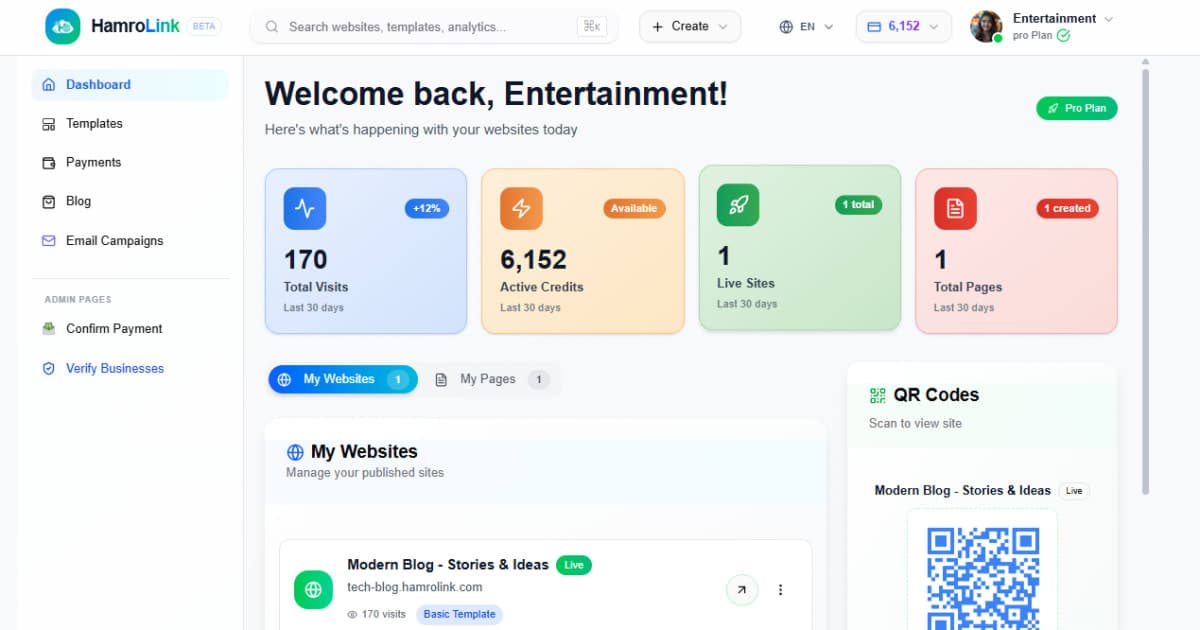
"When HamroLink launches, you'll be able to manage your website and email campaigns from one simple dashboard."
Essential Pages Every Business Website Should Have
You don't need 20 pages. For most Nepali businesses, these core pages are enough.
Home Page
This is the first page most visitors see. It should:
- Clearly state what you do and for whom
- Highlight your main services or offers
- Show a clear main action: call, visit, or fill out a form
Think of it as the digital version of standing outside your shop and introducing yourself in one sentence.
About Page
Use this page to tell your story:
- How you started
- Why you do what you do
- What makes you different
- Your values or mission
Adding a simple local story makes it relatable. For example:
"After the 2015 earthquake, we helped redesign and repair dozens of homes in Kirtipur. Since then, we've focused on safe, practical, and beautiful interiors for Nepali families."
Services or Products Page
Clearly list what you offer. For each item:
- Name of service/product
- Short description
- Optional starting price or price range
- Image (if relevant)
Avoid long paragraphs. Use bullets and headings so people can scan quickly.
Contact Page
Make it extremely easy to reach you. Include:
- Phone (with tap-to-call)
- Contact form
- Exact address
- Map embed
- Links to Facebook, Instagram, TikTok, etc.
You can add a short note: "We usually respond within 24 hours" to set expectations.
Portfolio or Gallery (Optional)
If your work is visual—construction, salon, event planning, photography, interior, bakery—add a gallery:
- Show your best 10–20 photos
- Add short captions (project type, location, result)
This works as social proof and helps new customers trust your quality.
Mobile-Friendly Checklist (Very Important for Nepal)
Since most people in Nepal browse on mobile, your website must work well on phones.
📱 Mobile-Friendly Checklist:
- Test your site on a 4G mobile connection (does it load within about 3 seconds?).
- Check that buttons are large enough for thumbs (at least around 44×44 px).
- Make sure text is readable without zooming (aim for at least 16px font size).
- Ensure your phone number is clickable and opens the dialer.
- Avoid tiny links or complex dropdown menus that are hard to tap.
Most website builders handle responsiveness automatically, but always test it yourself.
Common Mistakes to Avoid When Creating a Website
Avoid these frequent mistakes to make your website more effective:
- Overloading the homepage with too much text and images
- Using blurry, dark, or pixelated photos
- Hiding or forgetting contact details
- Writing vague descriptions like "We provide all kinds of services" instead of being specific
- Ignoring mobile layout and only checking on desktop
- Not updating the website for months or years
Keep it simple, clear, and up to date. A small, well-maintained site beats a big, outdated one.
Final Thoughts
Creating a business website in Nepal is no longer only for "tech people" or big companies. With modern, beginner-friendly tools, any business owner can set up a clean, professional website in a short time and at a reasonable cost.
A website helps you look more credible, appear in Google searches, and serve customers even when your shop is closed. In a world where many businesses still rely only on Facebook, your website can become your secret advantage.
HamroLink is Nepal's first AI-powered business presence platform—offering ready-made templates, built-in email marketing, AI chatbot, local payment integrations, and free business email so you can focus on running your business, not on learning complex technology.
Join Early Access for HamroLink
Nepali businesses are steadily moving toward more professional digital branding. Those who move early will benefit the most.
HamroLink is launching soon to help entrepreneurs, freelancers, and small businesses create professional websites in minutes, without any coding or confusing setups.
Early access users will receive:
- Launch credits for website features
- Priority access when the platform opens
- Special early adopter benefits and updates
- Launch price locked forever at NPR 399/month
Have more questions? Join the HamroLink waitlist and get notified when the platform launches so you can build your business website with the next generation of Nepal-focused digital tools.
Frequently Asked Questions
Can I create a website for my business without coding?
Yes. Modern website builders allow you to create websites using templates and drag-and-drop editors. You don't need to write any code.
How much does it cost to create a website in Nepal?
It depends. Hiring a freelancer or agency can cost from tens of thousands to lakhs of rupees. Using a website builder like HamroLink costs NPR 399/month with everything included—website, hosting, subdomain, business email, and email marketing.
How long does it take to create a business website?
If your content and images are ready, a basic website can often be created within a few hours. With HamroLink's templates, you can launch in under 15 minutes.
Is Facebook enough for a business?
Facebook is great for marketing and engagement, but it doesn't replace a website. A website gives you more control, credibility, and visibility on search engines like Google. Many customers check both—social media for activity and website for seriousness.
What if I'm not good with computers?
That's where simple builders come in. HamroLink guides you step by step so you mainly type your information and upload photos. If you can use Facebook, you can use HamroLink.
Do I get a professional email with my website?
Yes! With HamroLink, you get a free business email (yourbusiness@mail.hamrolink.com) included with your plan—no extra setup or cost.
HamroLink — Built for Nepal
Build your professional website from NPR 399/month — no coding required.
Join Early Access — FreeComments
Be the first to leave a comment.